
 Inobitec DICOM Viewer Lite
 Inobitec DICOM Viewer Pro
 Inobitec Web DICOM Viewer
 Inobitec DICOM Server (PACS)
2.30. Image Information in the Series Window
2.30.1 Orientation Cube
The Orientation Cube is located in the bottom right-hand corner (Fig. 2.92). The markers on the cube show the side the image is viewed from:
- A — Anterior
- R — Right
- L — Left
- P — Posterior
- F — Foot
- H — Head.
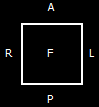
If "F" is written on the cube face, it means that the image is viewed from below; if "R" is written beside a rib, it means that the patient‘s right side is on this side of the image.
For details on the display settings for the orientation cube and letters (markers), see Section 2.27.
2.30.2 Scale
A graduated 10-cm scale is displayed on the right side of the window.
2.30.3 Image Information
The image information is displayed in the bottom left-hand corner. It may include the following parameters, depending on the study type:
- Image No — current image number in the series/total number of images in the series;
- Image size — image size (pixels);
- FOV (field of vision) — image size (millimeters);
- Location — image location determined by the device;
- Thickness — interval between slices.
For details on customizing the data concerning the image, see Section 2.27.
2.30.4 Patient Information
The information about the patient is displayed in the top left-hand corner.
For details on customizing the data concerning the patient (the patient ID, name, age, date of birth etc.), see Section 2.27.


