

Inobitec DICOM Server (PACS)
A reliable solution for secure storage and efficient management of DICOM data
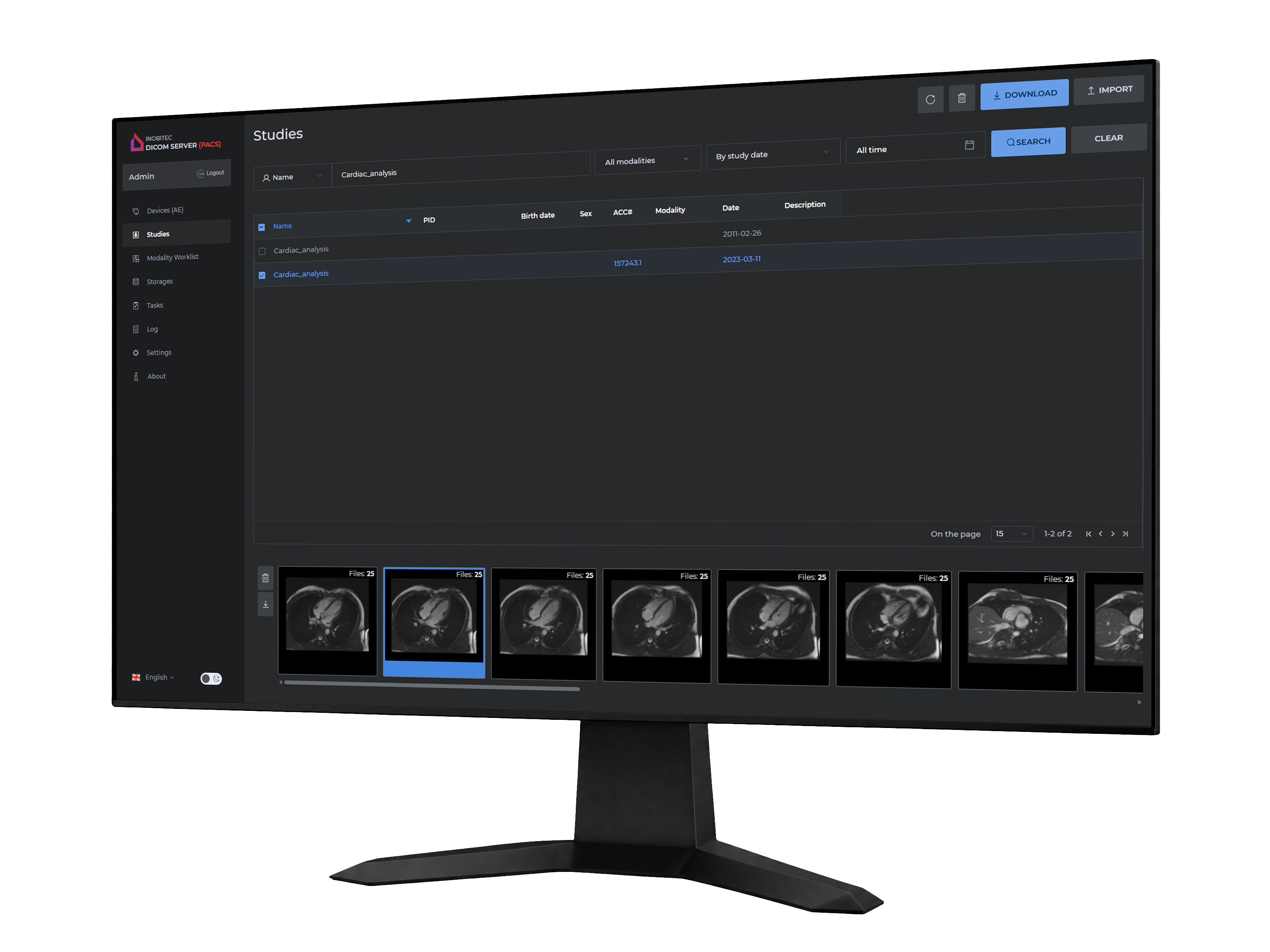
Key features & Capabilities
Сomplete medical data management for streamlined clinical routines
- Distributed data archives
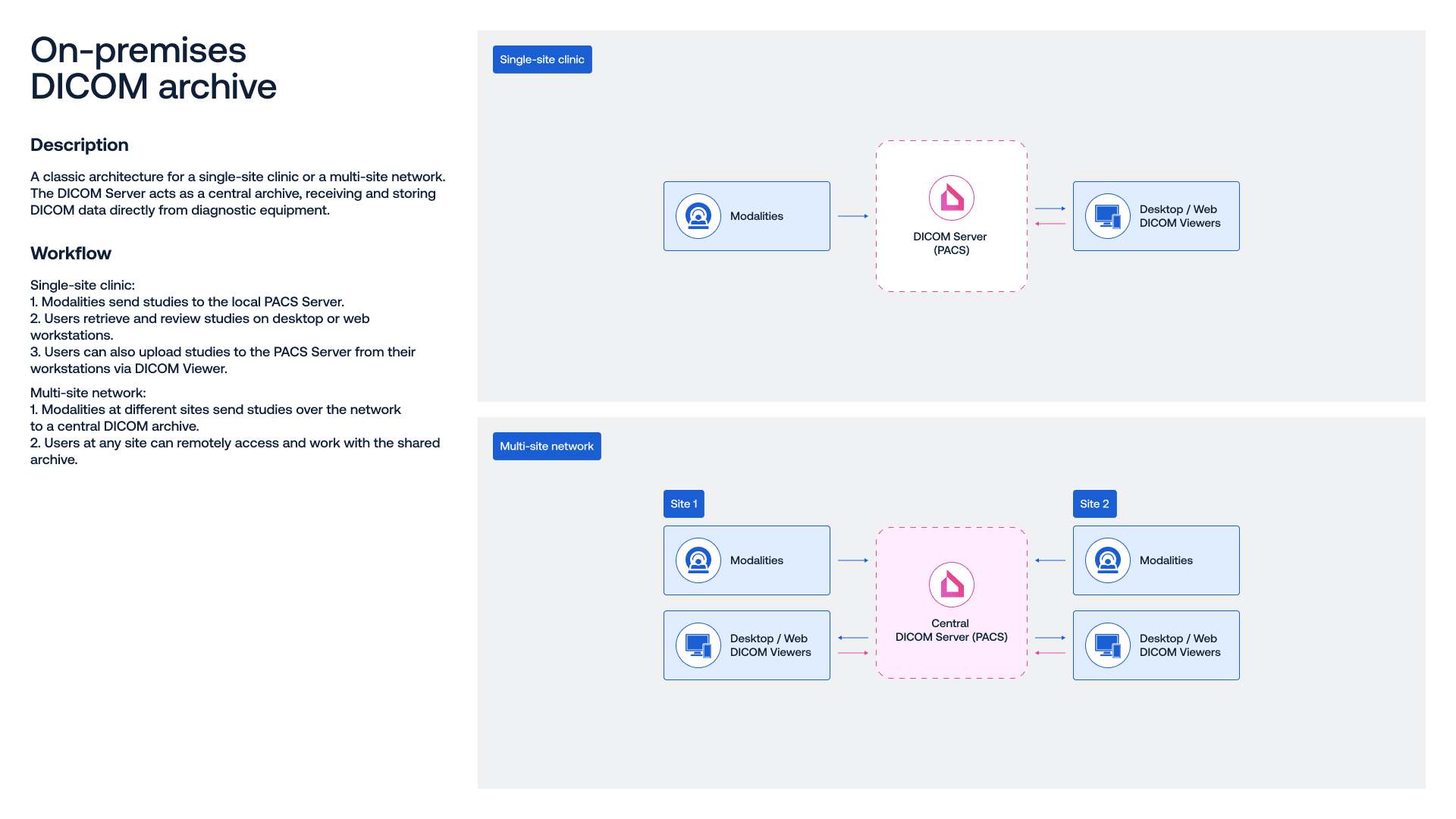
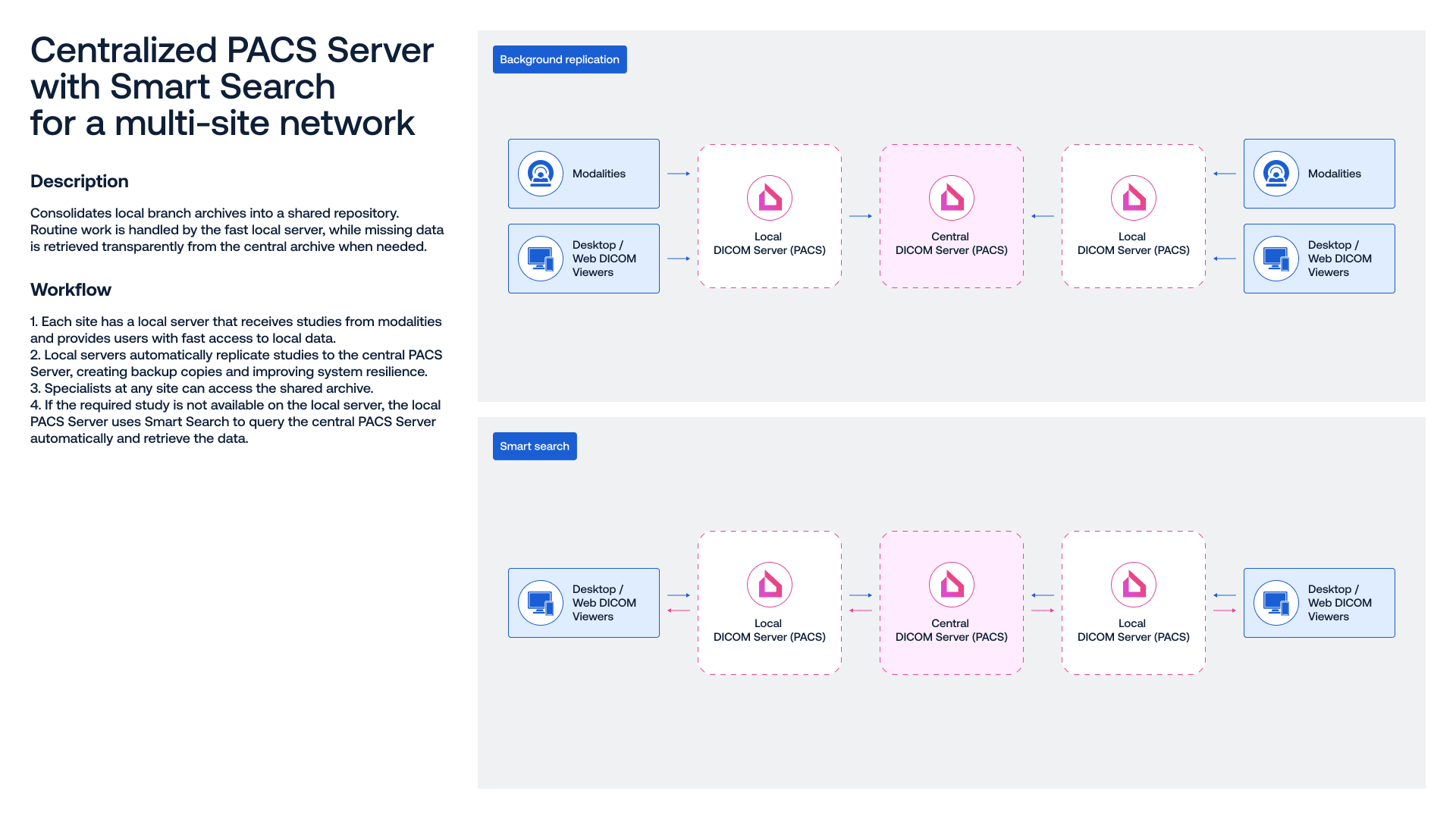
- A central PACS enables data exchange, synchronization, and centralized storage across local PACS servers in different clinic branches
- Server clustering
- Scale your medical network by adding new servers as your infrastructure grows
- High performance
- Fast data search and retrieval, with load balancing supported by scheduled storage maintenance tasks
- Vendor-Neutral Archive (VNA)
- Compatible with any DICOM-based viewer, RIS, or HIS, enabling seamless integration into your clinic’s IT environment without costly system replacement
- Dynamic conversion
- Choose the Transfer Syntax used for file exchange based on the capabilities of your connected systems and devices
- Archive migration
- Import your existing DICOM study archive into Inobitec DICOM Server (PACS)
- Responsive technical support
- Get expert assistance from real specialists, along with clear guidance on software installation and use

Functionality
- Support for Windows and Linux
- Compatibility with MySQL and PostgreSQL
- DICOM standard support for image storage and transfer, as well as Modality Worklist (MWL) storage
- Support for the WADO standard for HTTP-based access to studies
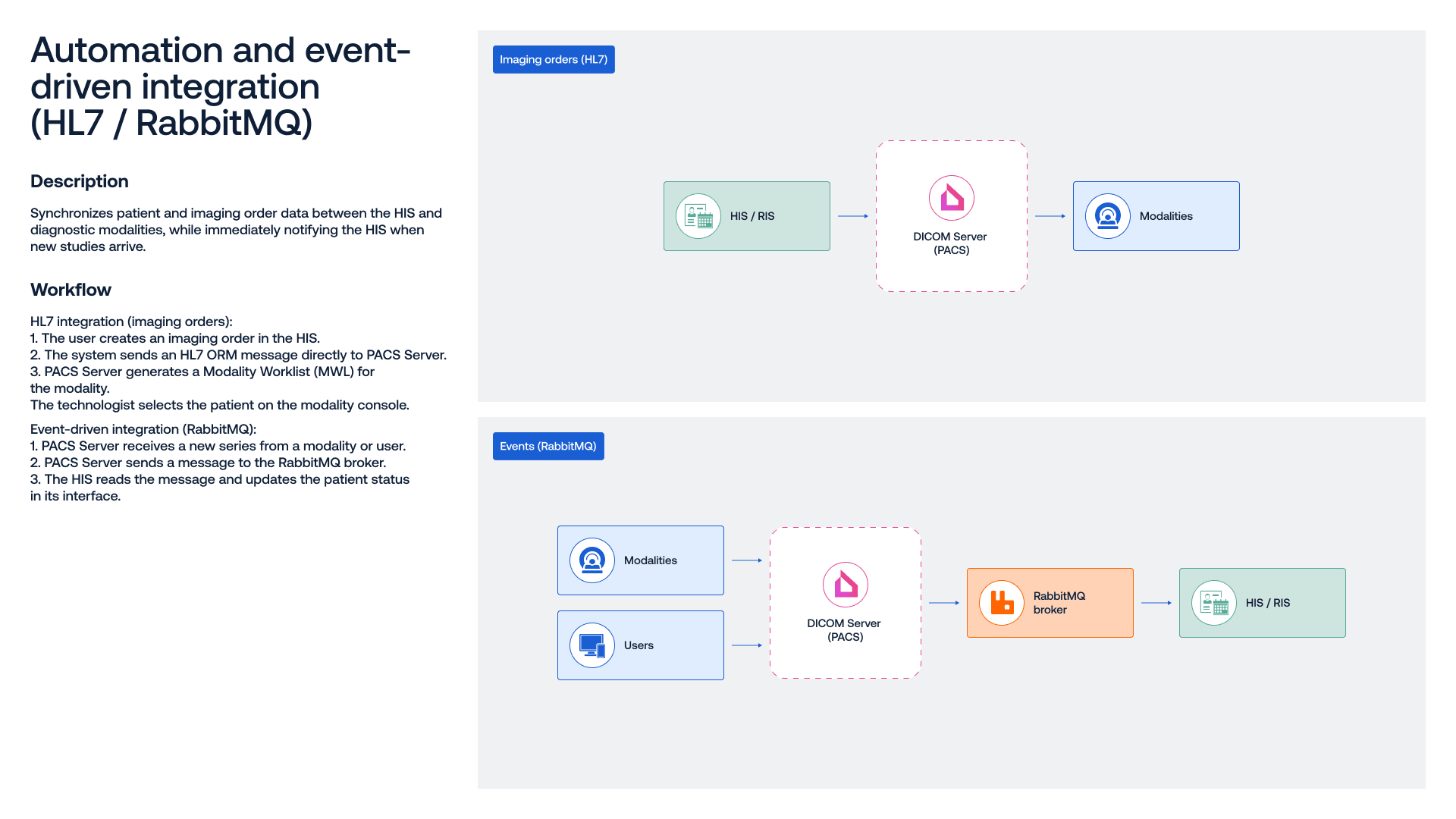
- Support for the HL7 standard
- Web-based administration panel for server management
- Granular access control for DICOM modalities and client devices (AE Titles)
- Migration utility for existing DICOM archives
- Archiving and configurable storage retention periods
- Central and local PACS servers for distributed clinic infrastructures
- Vendor neutrality (VNA)
- Secure DICOM communication over TLS
Download the full version and start your trial
Get 14 days of access to explore capabilities of Inobitec DICOM Server (PACS)


Pricing & licensing
Choose the сonfiguration that match your needs — without compromising on performance
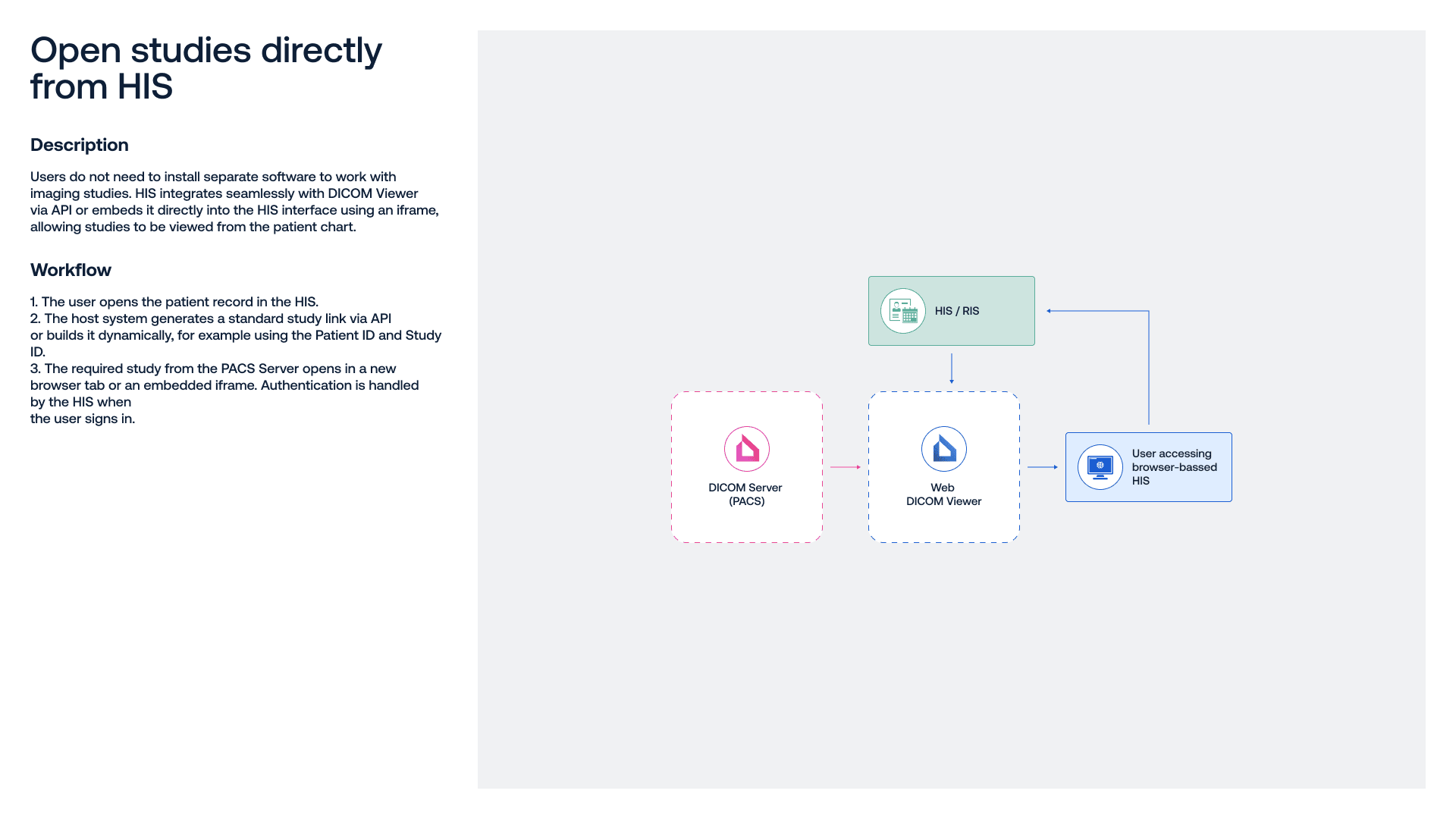
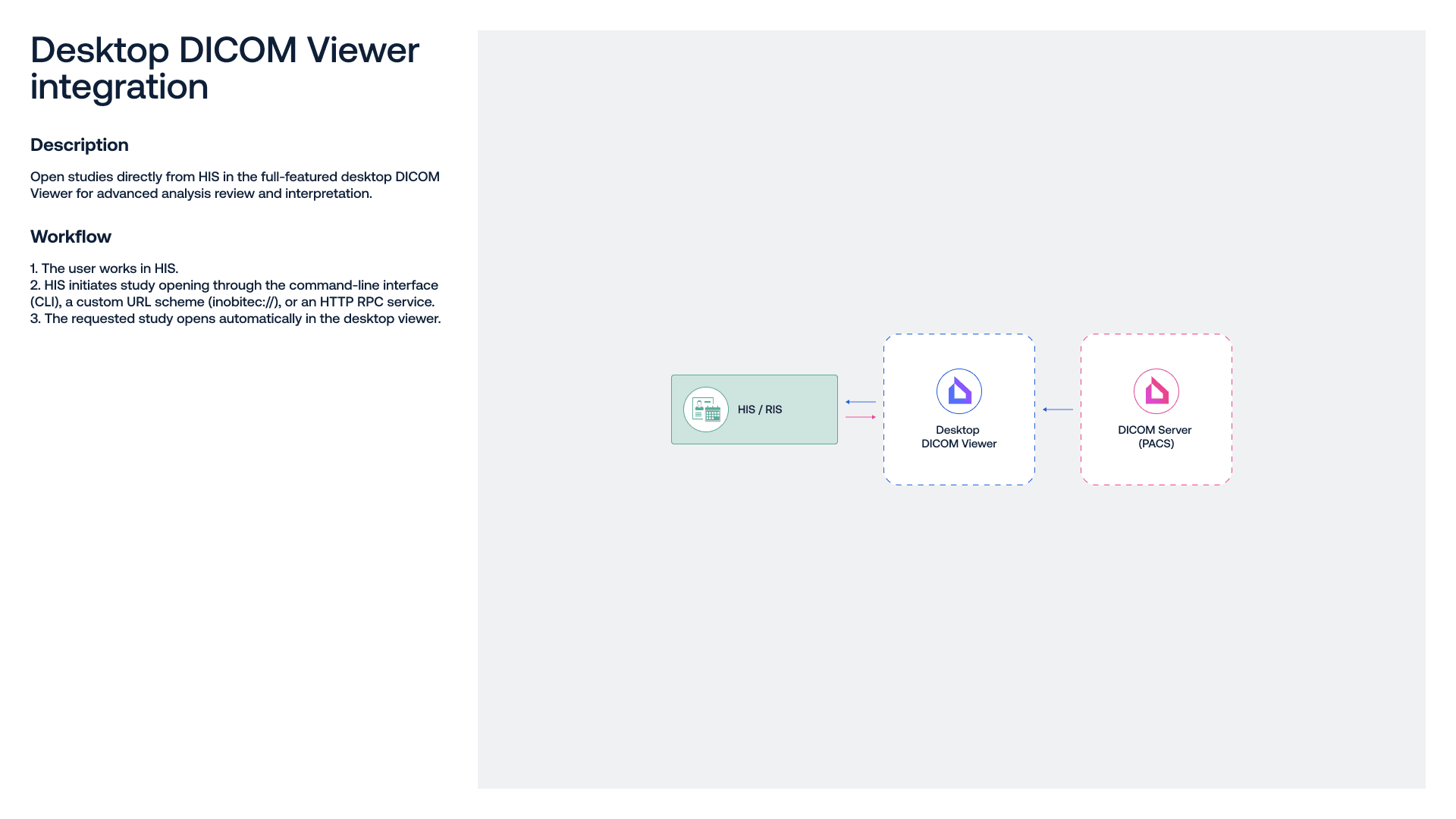
- Easy integration with clinical information systems (HIS/RIS)
- Flexible clustering for multi-site PACS deployments
- Support for the HL7 standard and RabbitMQ message broker
- Simple, web-based administration
- Vendor-neutral archive (VNA)

Documentation & Certificates
-

User manuals
-
-

-
-
-
Knowledge base

Release notes
Legend: [+] Added, [*] Improved, [-] Fixed.
Inobitec DICOM Server (PACS)
Edition upgrades:
General changes:
- [-] Fixed an error in compressing multi-frame series with the JPEG2000 codec
- [*] Optimized the execution of storage maintenance tasks: data transfer, archiving, and deletion tasks run independently without blocking tasks of other types
Edition upgrades:
General changes:
- [-] Association pool performance has been fixed
Combine our products for an end-to-end approach to your clinical needs
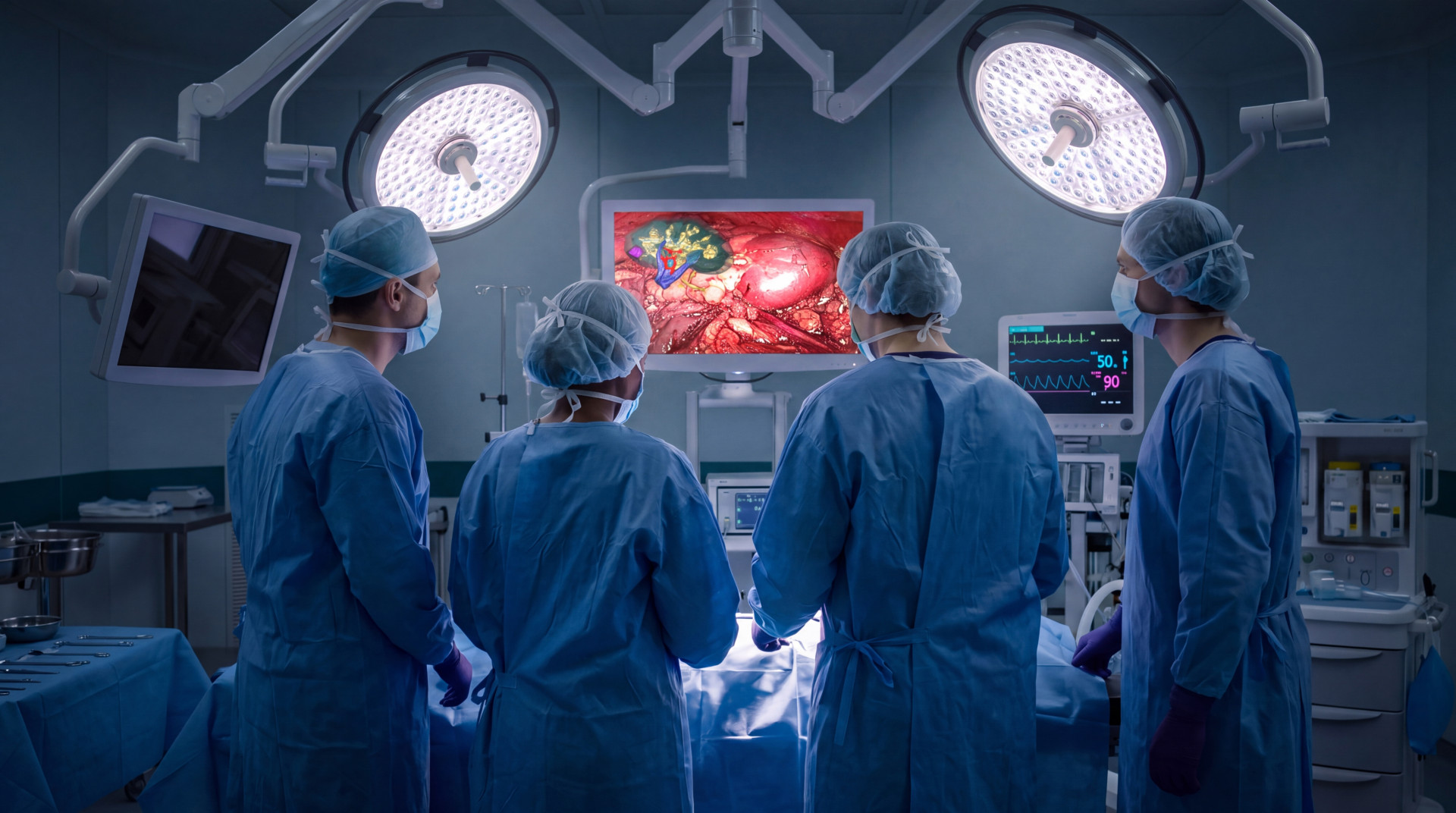
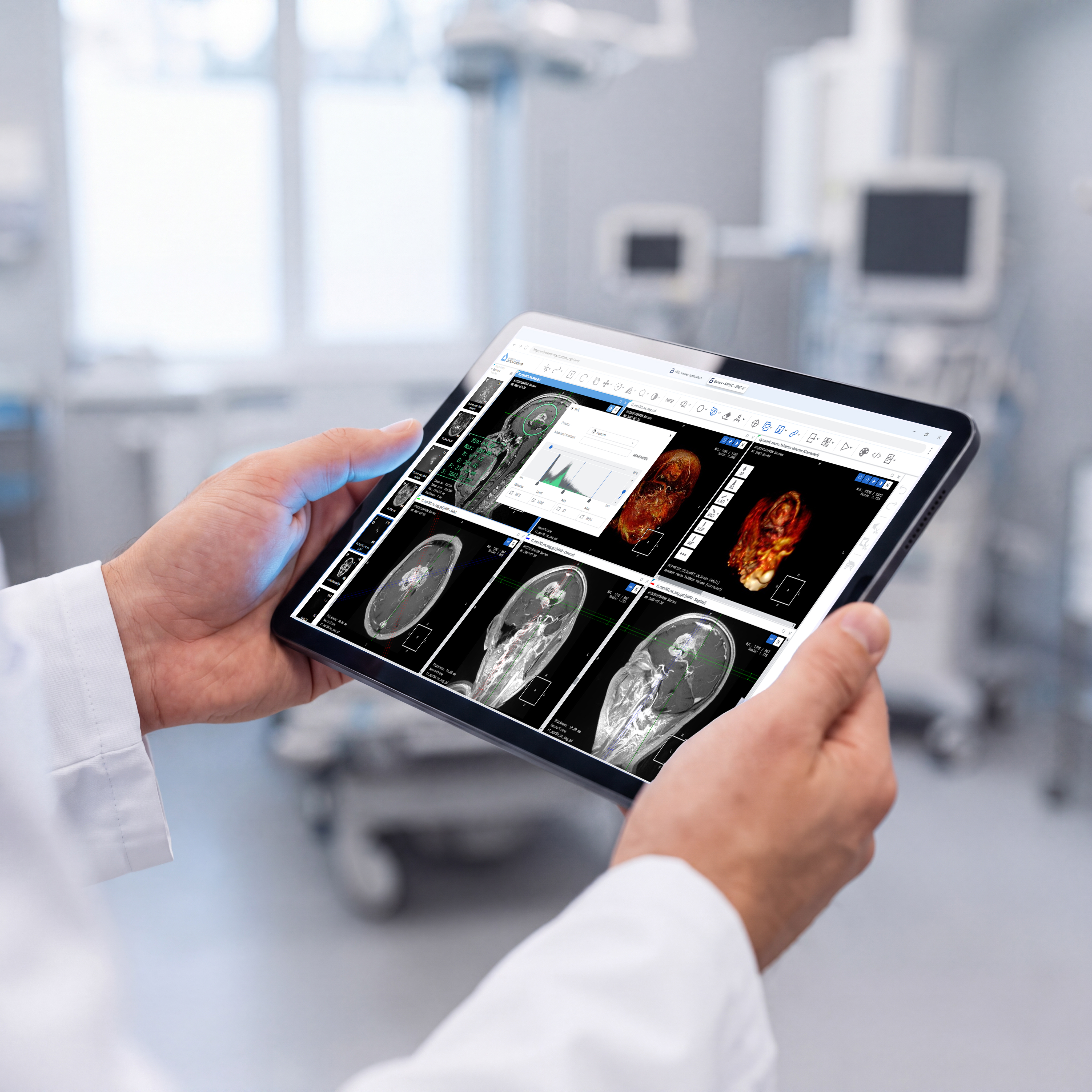
3D, MPR, segmentation, and advanced post-processing to support complex use cases in surgery, oncology, cardiology, bioengineering, veterinary care, and other specialties.
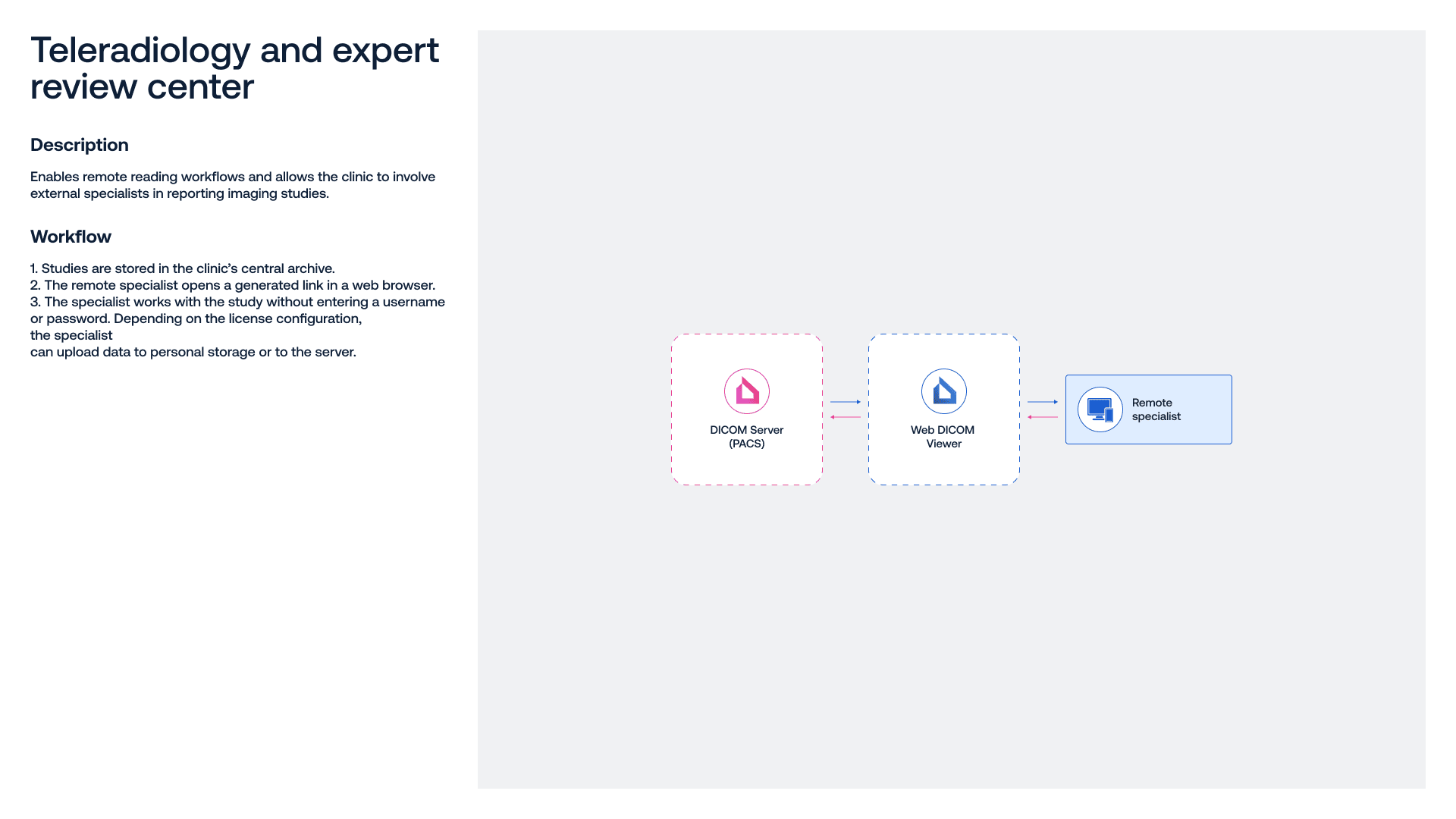
Secure local and remote access to DICOM data, with browser-based links to view and share studies for collaboration, training, or second opinions.
Fast saving and transfer of large volumes of DICOM data, study management between central and distributed (branch) archives, as well as printing and exporting finalized results.
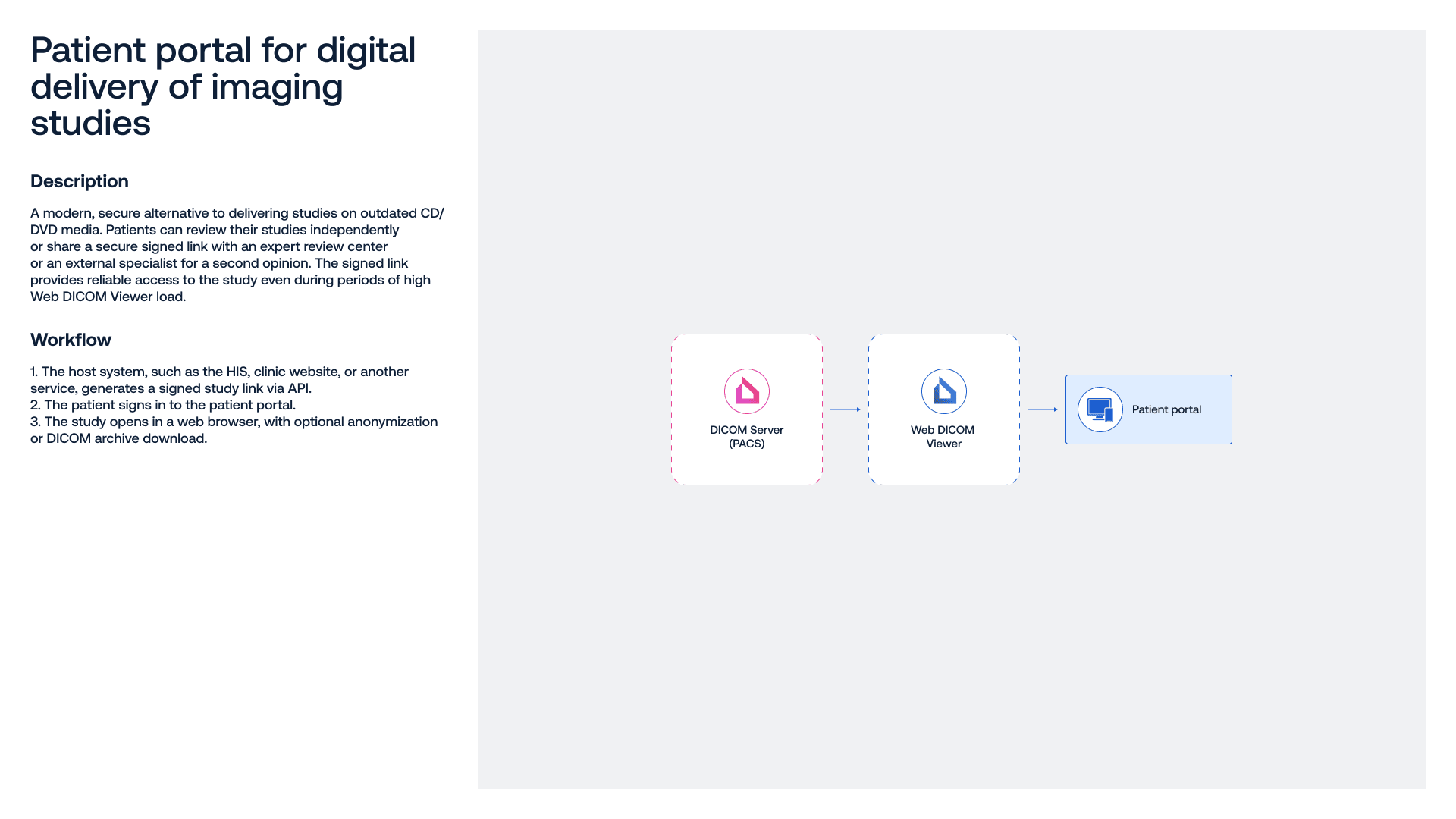
Seamless integration with existing hospital IT systems (RIS / HIS / PACS), transferring results to patient portals, and quick access to studies directly from physician or administrator interfaces.
Protect patient privacy with DICOM de-identification for storage, education, research, and collaboration.
From installation to everyday use: technical support, a self-serve knowledge base, and tailored training for your specialists.
Runs on Windows, macOS, and Linux, and supports VNA-compatible systems for easy integration into any IT infrastructure.
Development of additional product functionality based on custom technical requirements and adaptation for specific clinical tasks.
Testimonials
We have been using Inobitec DICOM Viewer Pro Edition for about four months. Before discovering the company and its product, we had tried several other solutions, including both open-source software and trial versions of paid products. After spending the first few days…
We have been using Inobitec DICOM Viewer Pro Edition for about four months. Before discovering the company and its product, we had tried several other solutions, including both open-source software and trial versions of paid products. After spending the first few days getting familiar with the interface and the various features available in this excellent software, we were able to appreciate its performance and the speed with which we can carry out our daily procedures. We have seen approximately a 30% reduction in the time required from the start of the process to the completed reconstructed model, which has allowed us to significantly increase the daily workload we are able to handle. We are extremely satisfied to have discovered and purchased this software. Thanks also to the continuous updates provided by the company, we have a cutting-edge product that is constantly evolving. I would recommend it to anyone looking for this type of software, both for its very affordable price and for the capabilities it provides.

CEO, CriPax Creations
Italy
CEO, CriPax Creations
I discovered Inobitec DICOM Viewer in November 2016, while it was still in the early stages of development, I started using it as my main tool in August 2019, and I have been using it to handle all my workload in cancer imaging ever since, which, I believe, allows me…
I discovered Inobitec DICOM Viewer in November 2016, while it was still in the early stages of development, I started using it as my main tool in August 2019, and I have been using it to handle all my workload in cancer imaging ever since, which, I believe, allows me to testify not only of the quality of the software itself, but also of the incredible pace of its continuous development from an early stages image viewer to the advanced medical imaging suite it is today.
This short review cannot even remotely illustrate how well designed, fast, stable and feature rich, how truly wonderful and outstanding this piece of software really is.
The design of the Viewer is modular – it comprises of DICOM Database Handling Module, 2D Image Viewer, MPR Module with powerful automatic, semiautomatic and manual image segmentation tools, 3D Volume Rendering Module, Series Fusion and Virtual Endoscopy Module, which are included in the main package, and three additional modules available for separate purchase – PET-CT, Vessel Analysis and Coronary Arteries Analysis. The last one I haven’t used, due to the nature of my workload, all others I use on a daily basis.
The short format of the review does not permit the detailed analysis of each individual module, each outstanding on its own and with literally myriads of tools and options, therefore I shall only stress out that all the modules are seamlessly integrated and all of them can be used SIMULTANEOUSLY! The main feature of the Viewer, which allows it, is the ingenious option to open multiple instances of any of the modules in tabs, like one would use multiple tabs in a web browser, either in a single or multiple monitor setup. Additionally, each of the monitors on a viewing workstation can be divided into two independent virtual displays, each of which, in turn, can be individually split into tiles and hold multiple instances of any of the modules. In practical terms – the user can simultaneously open, analyse and compare any number and any combination of CT, PET-CT, MRI, mammography, ultrasonography, CT/conventional coronarography, CT/MRI/DSA angiography, or any other DICOM studies at the same time for a single patient or multiple patients while importing, exporting, archiving and CD/DVD burning any number of studies/exams in the background. The only practical limitation is the hardware used to run the Viewer.
As far as the hardware is concerned, the Viewer can be used on an extremely wide range of systems, from very light and portable laptops with dual or quad core CPUs, integrated GPUs and limited amount of RAM memory, to powerful desktop workstations with dedicated nVidia or AMD GPUs, and is being simultaneously developed for Windows, Linux and Mac OS.
I shall use the conclusion of my review to express my deepest gratitude to the whole team of wonderful people at the Inobitec Company for creating and continuously developing their outstanding product.

Radiologist; Consultant for Cancer Imaging, Serbian Medical Chamber
Serbia
Radiologist; Consultant for Cancer Imaging, Serbian Medical Chamber
Warm greetings. I would like to thank you for providing access to Inobitec DICOM Viewer. I began using it as a tool for cardiovascular, bariatric surgery, oncology, and primarily COVID-19 cases, and it has enabled me to work with important clinical cases in an easy,…
Warm greetings. I would like to thank you for providing access to Inobitec DICOM Viewer. I began using it as a tool for cardiovascular, bariatric surgery, oncology, and primarily COVID-19 cases, and it has enabled me to work with important clinical cases in an easy, intuitive, and practical way. I have shared my experience on social media and in teaching with colleagues and residents, as well as in conference cases, promoting its use with case-related hashtags.
I strongly value its contribution to modern medicine, transforming both clinical practice and the teaching paradigm. It is a high-quality solution. During my professional career I have used different tools, and as someone who embraces technology, I can say that DICOM Viewer is highly useful in medical practice, with an intuitive learning curve—especially when you know exactly what you are looking for.
I still notice that many colleagues, particularly in Latin America where I exchange opinions and experience most frequently, tend not to use workstations and different applications according to the clinical scenario, but rather limit themselves to digital viewing of studies. For this reason, we need to continue promoting this type of technology and, in my view, focus strongly on education—especially residents and fellows, who will become the real drivers of transformation with the support of attending physicians and professors.
I congratulate you on this remarkable development, which I see has already incorporated artificial intelligence—another important advantage worth highlighting.

Medical Director; Specialist in Radiology and Diagnostic Imaging; Professor, Colegio Interamericano de Radiología (CIR)
Venezuela
Medical Director; Specialist in Radiology and Diagnostic Imaging; Professor, Colegio Interamericano de Radiología (CIR)
Dear Inobitec, After trying Inobitec DICOM Viewer at the end of 2021, we found that the product meets our needs for three-dimensional visualization of pathological areas in the human body. At present, we mainly use it to segment pulmonary arteries and veins, liver…
Dear Inobitec,
After trying Inobitec DICOM Viewer at the end of 2021, we found that the product meets our needs for three-dimensional visualization of pathological areas in the human body. At present, we mainly use it to segment pulmonary arteries and veins, liver parenchyma, and hepatic arteries and veins in medical imaging datasets. We also plan to explore more of the software’s capabilities and hope it can support us in additional areas.
The functions we use most frequently in our work currently include: (1) automatic generation of pulmonary vascular models with adjustable data thresholds; and (2) differentiation of liver structure types. After using the software for some time, we have found one particularly valuable characteristic: vascular segmentation is very convenient and fast.

CEO in Precise (Xiamen) Medical Technology Co., Ltd.
China
CEO in Precise (Xiamen) Medical Technology Co., Ltd.
I discovered this software by chance during 2021 while looking for an effective segmentation solution that would make it easy to create 3D-printed models of patients’ fractures for several purposes: preoperative planning, intraoperative assistance, patient education,…
I discovered this software by chance during 2021 while looking for an effective segmentation solution that would make it easy to create 3D-printed models of patients’ fractures for several purposes: preoperative planning, intraoperative assistance, patient education, and resident training.
After a period of consideration, I purchased an Inobitec DICOM Viewer Pro license for this purpose in December 2021. I am therefore still a relatively new user, but even my short experience has been enough to demonstrate the quality of the software.
Purchasing the license includes high-quality, personalized support. The software is quick to learn, and the interface is comprehensive and intuitive. The user can open, analyze, and compare all examinations for the same patient. It is a stable and very powerful solution that makes it possible to obtain exceptionally high-quality segmentations. In my own work, bone segmentation is very easy, and the 3D visualization is excellent thanks to the contrast options; the semi-automatic segmentation tools are equally impressive.
For more complex cases, the ability to save the work and resume segmentation exactly where it was left is very useful.
For 3D printing, exporting meshes as .ply, .stl, or .obj files is very easy, and the files produced by the software can be sent directly to a slicer without necessarily passing through another processing application, which is extremely valuable to me.
This software meets all the expectations of a trauma surgeon and a 3D-printing user. I can only recommend it to anyone looking for software for these purposes.

Orthopaedic and Trauma Surgery Department, CHU Brest
France
Orthopaedic and Trauma Surgery Department, CHU Brest
We at QUBX Information Technology would like to thank Inobitec for the entire process of acquiring their software, starting with the sales team and their professional approach in dealing with us and introducing the company, the software, and its key features. We would…
We at QUBX Information Technology would like to thank Inobitec for the entire process of acquiring their software, starting with the sales team and their professional approach in dealing with us and introducing the company, the software, and its key features.
We would also like to thank the technical team, who spared no effort in explaining the software tools in detail and providing comprehensive answers to all our questions.
The process then returned to the sales team, who made the final purchase and acquisition procedure easy to complete.
In the end, we obtained one of the best and easiest-to-use software solutions for processing medical imaging studies.
We thank Inobitec for this excellent software and look forward to further cooperation in the near future on specialized projects.

Chairman of the Board, QUBX Information Technology
Egypt
Chairman of the Board, QUBX Information Technology
As a researcher who has worked for many years in three-dimensional modeling, segmentation, and flow analysis in the field of pediatric heart disease, I place great importance on gaining hands-on experience with available software. Working in an interdisciplinary field…
As a researcher who has worked for many years in three-dimensional modeling, segmentation, and flow analysis in the field of pediatric heart disease, I place great importance on gaining hands-on experience with available software. Working in an interdisciplinary field requires evaluating options that may not yet be widely used and, after comparison, continuing with the solution that has the most meaningful impact. For this reason, we need to follow the latest developments and become increasingly selective, analytical, and demanding in order to identify the most practical and effective solutions for our workflow.
I have had the opportunity to participate in many projects requiring collaboration across different disciplines, and the common starting point of these projects has been medical imaging data. In addition to having a successful PACS infrastructure in the hospital, this requires us to take advantage of the latest technological capabilities available for every imaging workflow used for diagnosis and treatment. Standard systems do not always provide full access to all the information contained in existing images. We therefore need systems designed to reveal this hidden information by quantifying data and converting it into graphical form. In addition to improving diagnostic and treatment quality, tools that simplify healthcare workflows, reduce time spent, and contribute positively to decision-making are extremely valuable for any institution pursuing innovative policies. When developing our research protocols and selecting tools that meet our needs, we therefore prefer solutions that evolve in parallel with technological development and user requirements.
I was introduced to Inobitec in February 2021 thanks to the highly valued Egor Seldev. As someone who has spent years creating models by annotating images with in-house or commercial software, the first feature I appreciated most was the ability to perform segmentation very quickly and eliminate surrounding tissues without additional steps. We found that the software is particularly valuable because it provides the information needed for preoperative planning, surgical scenario modeling, 3D replicas, patient-specific implant design, and—my personal favorite—computational fluid dynamics studies. With DICOM Viewer Pro, it is possible to obtain blood-flow graphs for a selected vessel from MR data, and the software can provide more than we require for computational fluid dynamics. We have experienced its indisputable contribution both to clinical workflows and to related engineering work, especially in developing patient-specific solutions for treatment planning in congenital heart diseases such as Fontan circulation, TOF, and TGA. Features such as producing polygonal mesh output for fiber mapping with DT-MR, assessing cerebral blood volume with the perfusion mode algorithm, determining calcium scores and differentiating fibrous and fatty tissues with coronary artery analysis, working with several imaging datasets simultaneously, and importing STL files from other platforms make it a valuable tool in many respects. We are also able to observe its continuous evolution thanks to its dynamic development model.
On behalf of my institution, our patients, my students, and my collaborators, I would like to thank the Inobitec team for always being available whenever we need them and for treating user feedback and user needs as a priority.

Assistant Professor, Istanbul Medipol University
Turkey
Assistant Professor, Istanbul Medipol University
We would like to recognize INOBITEC and its DICOM VIEWER PRO software as a powerful tool for the visualization and interpretation of medical images. We have been using the software for two years, and it has enabled us to reduce workflow times and improve the quality of…
We would like to recognize INOBITEC and its DICOM VIEWER PRO software as a powerful tool for the visualization and interpretation of medical images. We have been using the software for two years, and it has enabled us to reduce workflow times and improve the quality of our final results.
The software offers many modules tailored to different user needs. In our case, the functions we use most are 3D reconstruction, MPR (multiplanar view), segmentation modules, and geometry generation using surfaces. The software has a short learning curve, is easy to implement, and makes impressive use of computing resources, with DICOM image manipulation taking place almost instantly. One of its clear advantages is the speed of operation, which makes the software very comfortable to use.
Our design sessions with the medical team have become more dynamic and informative and help us understand anatomical details in greater depth thanks to the segmentation modules and the user-friendly visualization interface with colors and transparency controls.
INOBITEC has definitely met our expectations, and ongoing software updates continue to make it faster and easier to operate.

Director of Innovation, MURO Diseño en Tecnología Biomédica S.A. de C.V.
Mexico
Director of Innovation, MURO Diseño en Tecnología Biomédica S.A. de C.V.
Our Virtual Surgical Planning and 3D Printing Unit at Pereira Rossell Hospital Center Radiology Department has been using Inobitec DICOM Viewer PRO with the Extended Segmentation Module for over 2 years now and I am writing this letter as a short review of our great…
Our Virtual Surgical Planning and 3D Printing Unit at Pereira Rossell Hospital Center Radiology Department has been using Inobitec DICOM Viewer PRO with the Extended Segmentation Module for over 2 years now and I am writing this letter as a short review of our great experience with it.
The first outstanding feature I would like to highlight is how intuitive the tool is, since after only a 1-hour online demo, I was able to successfully start working on my own cases. As a radiologist, my time is very valuable, and I usually think twice before migrating to new software options because of the time it takes to learn my way around new tools. With Inobitec, however, my learning curve was very fast and I am glad I made the decision to give it a try.
Before using Inobitec, I had tried many popular commercial and open-source segmentation software. I can therefore confidently affirm that with Inobitec I can achieve better quality biomodeling results in less than half the time it would take me with other available software tools. It offers a great variety of automatic tools to segment the usual anatomical structures of interest (bone, vessels, airway), paired with excellent algorithms to make it easier to post-process 3D structures. Even usually tedious tasks such as separating adjacent bones or isolating heart cavities and vessels are ready semi-automatically in a couple minutes. It also offers the usual manual segmentation tools (watershed, region growing, brushes) but they have gone one step further to improve them and make them very responsive.
Achieved biomodels look great and it offers a very useful feature of overlaying biomodels to DICOM planes and transparency mode, which greatly improve complex patient feature understanding for surgical planning. The available “cutting tools” and “cut-object tools” together with the possibility of “union”, “subtraction” and “intersection”, as well as “growing” and “shrinking” tools have allowed us to plan initial steps of resection surgery. In addition, the “virtual endoscopy” mode has been a magnificent addition to complete patient evaluation and make the most of their medical images to achieve better clinical and surgical outcomes.
Finally, I would like to highlight the excellent post-sales at Inobitec team, which are always very responsive to questions and suggestions for image processing and biomodeling. They have also taken into consideration many suggestions I have made as a user, which I have been glad to see included in following versions of the software.
In conclusion, Inobitec DICOM Viewer Pro rapidly became an essential tool of our Virtual Planning and 3D Printing Unit at Pereira Rossell Hospital Center due to its outstanding possibilities in biomodeling, the fast learning curve and the many time-saving intuitive tools available.

Radiologist; Head of Virtual Surgical Planning and 3D Printing Unit, Radiology Department, Pereira Rossell Hospital Center
Uruguay
Radiologist; Head of Virtual Surgical Planning and 3D Printing Unit, Radiology Department, Pereira Rossell Hospital Center
I would like to share my professional evaluation of Inobitec DICOM Viewer Pro. As head of the hospital’s advanced reconstruction laboratory and diagnostic imaging service, I have used several software solutions for complex segmentation of anatomical and pathological…
I would like to share my professional evaluation of Inobitec DICOM Viewer Pro. As head of the hospital’s advanced reconstruction laboratory and diagnostic imaging service, I have used several software solutions for complex segmentation of anatomical and pathological structures, as well as for viewing DICOM images for diagnostic purposes.
When I started using DICOM Viewer Pro, I was impressed by the number of available tools and how easy the software is to use, especially for segmentation. Its flexibility in creating masks and working with multiple phases of a study enables more precise segmentation and supports surgeons in preoperative planning.
Today, DICOM Viewer Pro is the gold-standard software in our 3D reconstruction laboratory.

Head of the Advanced Reconstruction Laboratory and Diagnostic Imaging Service, Casa de Saúde São José
Brazil
Head of the Advanced Reconstruction Laboratory and Diagnostic Imaging Service, Casa de Saúde São José
Dear Inobitec, I am writing on behalf of the Department of Neurosurgery at the Institute of Emergency Medicine to express our profound gratitude for the invaluable contribution that Inobitec DICOM Pro Viewer software has made to our surgical endeavors. The seamless…
Dear Inobitec,
I am writing on behalf of the Department of Neurosurgery at the Institute of Emergency Medicine to express our profound gratitude for the invaluable contribution that Inobitec DICOM Pro Viewer software has made to our surgical endeavors.
The seamless integration of Inobitec DICOM Pro Viewer into our workflow has significantly enhanced our surgical planning processes. The software's advanced capabilities in handling DICOM data have been instrumental in providing us with detailed and high-quality images, facilitating a thorough analysis of patient anatomy. This has proven to be of utmost importance in pre-operative planning, allowing us to strategize and optimize our approaches for a variety of neurosurgical cases.
Moreover, the software's functionality in 3D reconstruction has been a game-changer for us. The ability to visualize complex anatomical structures in three dimensions has greatly improved our understanding of patient-specific nuances, ultimately leading to more precise and targeted interventions. The immersive 3D reconstructions have not only enhanced our surgical accuracy but also significantly improved our communication with patients, ensuring they have a clearer understanding of their condition and the proposed surgical interventions.
In addition to its role in surgical planning, the Inobitec DICOM Pro Viewer software has been an invaluable tool for educational purposes within our department. The intuitive interface and user-friendly features have made it an excellent resource for teaching and training our residents and fellows. The software's ability to generate interactive 3D models has allowed us to convey complex surgical concepts in a comprehensible manner, fostering a rich learning environment for our medical professionals.
Furthermore, the support for 3D printing has been a remarkable asset. The software's compatibility with 3D printing technology has enabled us to create tangible, patient-specific models for hands-on training, enhancing the skills of our surgical team. These 3D-printed models have proven to be particularly beneficial in challenging cases, allowing us to practice and refine our surgical approaches before entering the operating room.
We extend our sincere appreciation to the Inobitec team for developing such a cutting-edge and impactful tool. Thank you once again for your commitment to advancing medical technology, and we look forward to continued collaboration and innovation in the field.

Chief of Neurosurgery Department, Institute of Emergency Medicine
Moldova
Chief of Neurosurgery Department, Institute of Emergency Medicine
I would like to record our recognition of the quality and usability of INOBITEC software functionality for DICOM imaging, particularly for performing complex segmentation and virtual reconstruction of anatomical and pathological structures of the human body. As…
I would like to record our recognition of the quality and usability of INOBITEC software functionality for DICOM imaging, particularly for performing complex segmentation and virtual reconstruction of anatomical and pathological structures of the human body.
As coordinator of the multi-user research and innovation unit for three-dimensional technologies in healthcare, and as a physician specializing in Radiology and Diagnostic Imaging, I can say that the software exceeds expectations and contributes directly to clinical and surgical decision-making.
Physician, Radiologist; Innovation & Digital Health Leader; Telehealth Coordinator
Brazil
Physician, Radiologist; Innovation & Digital Health Leader; Telehealth Coordinator
Inobitec DICOM Viewer PRO is advanced medical imaging processing software built with a very fast, high-quality volume-rendering engine and sophisticated programming technologies. Developed through close discussions with clinicians, it provides specialized 2D and 3D…
Inobitec DICOM Viewer PRO is advanced medical imaging processing software built with a very fast, high-quality volume-rendering engine and sophisticated programming technologies. Developed through close discussions with clinicians, it provides specialized 2D and 3D image processing and analysis capabilities for multiple medical specialties. In particular, for young researchers with strong computer and mathematical skills, it is an advanced medical image analysis solution available at a very reasonable price and is highly valued by individual researchers around the world.
Its intuitive interface makes it easy to select patients from a DICOM database via PACS communication. By selecting DICOM studies acquired at different time points, advanced 3D non-rigid registration can also be performed, which is especially useful for pre- and postoperative surgical assessment. The software provides a wide variety of easy-to-use segmentation methods for extracting organs, tissues, and lesions.
After vessels and other structures have been extracted, a centerline-tracking algorithm can be used. This makes it possible to evaluate the degree of luminal stenosis using straightened vessel views, and even to display the tortuous colon using VGP (virtual gross pathology).
In addition to 3D processing based on morphological information from CT and other modalities, MRI functions include tractography of the nervous system and perfusion analysis. Functional analysis is also available, and PET supports various SUV measurements, including spherical VOIs, as well as image fusion. Inobitec DICOM Viewer PRO brings together advanced imaging capabilities for a wide range of medical specialties.
The Inobitec team is an exceptionally skilled programming group with strong medical expertise, continuously providing new and up-to-date medical image processing technologies as the field advances.
As the saying goes, “seeing is believing.” I strongly encourage you to try Inobitec DICOM Viewer for yourself.

CEO, LISIT Co., Ltd.
Japan
CEO, LISIT Co., Ltd.
User Services & Onboarding
Product training
Hands-on training for individuals and teams-built around real cases from your field.
- Remote Format
- Simple Information Delivery
- Prompt Tech Support
- Practical Cases
- Flexible Scheduling



FAQ
Yes. You can download and install a fully functional 14-day trial for your operating system here. This is the same version you will continue using after purchasing – no reinstallation required.
Yes. The User Manual covering all features is available as downloadable PDF file. You can also use a Knowledge base with detailed installation and setup instructions including licensing.
All support requests are handled by real experts—no bots. Our team aims to respond to inquiries and resolve issues within one business day. Technical support is available for the entire time you use our products.
Additional services for comprehensive setup and installation are also available. For questions or requests, contact us at support@inobitec.com.
Inobitec products are designed as a flexible ecosystem of separate solutions that can be combined and customized for specific clinical needs.
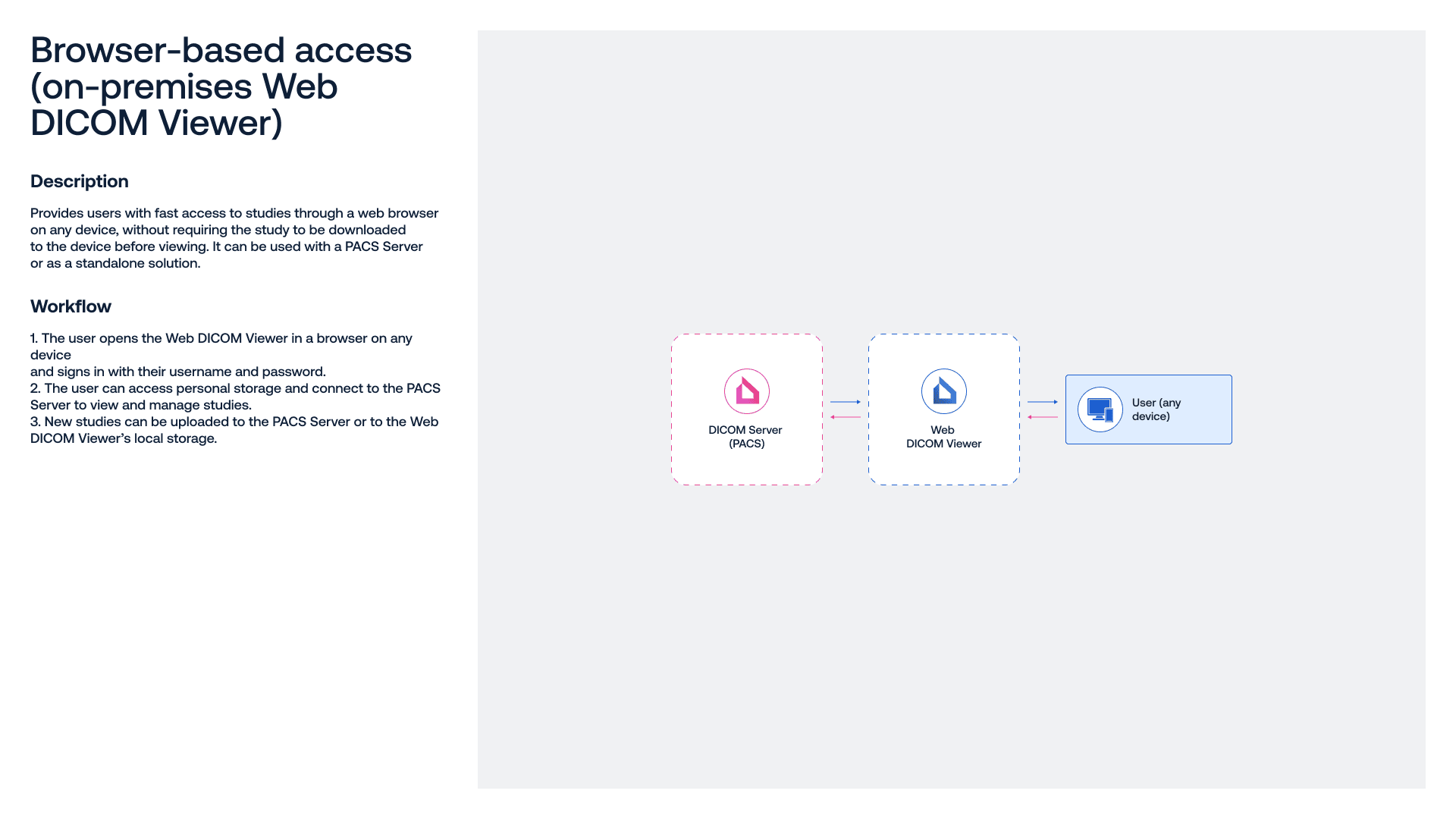
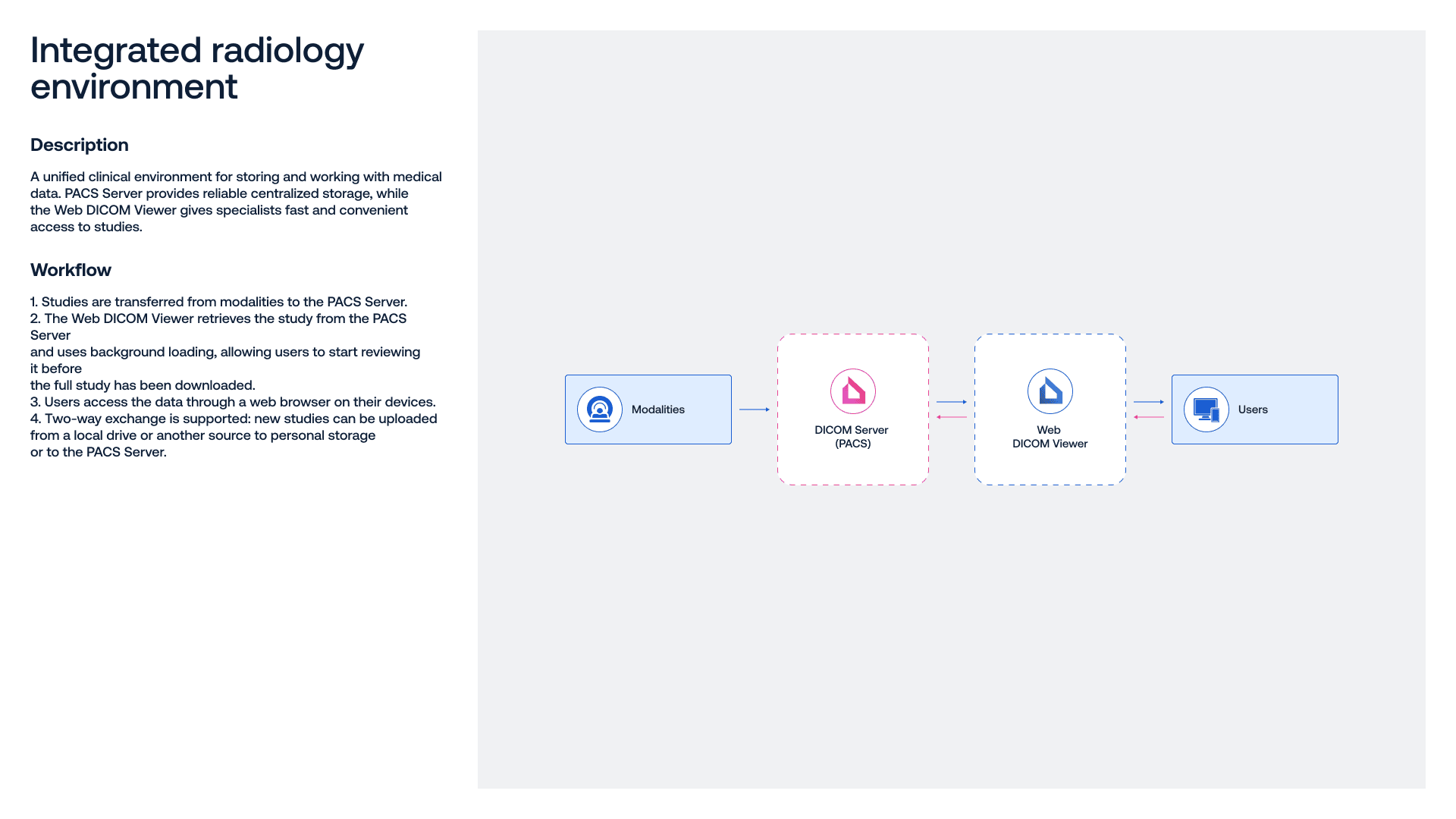
Inobitec Web DICOM Viewer is a standalone product with its own functionality and broad integration capabilities, making it easy to integrate into existing systems, including PACS.
Yes. Inobitec DICOM Server can be easily integrated with any DICOM-compatible equipment or system, regardless of vendor, so it fits smoothly into your existing healthcare IT environment.
Yes. Inobitec DICOM Server supports HL7 starting from version 2.12.0.
No. Inobitec DICOM Server allows storage of any volume of studies without fixed limits.
Inobitec DICOM Server stores studies in the DICOM format. Study records are stored separately in a connected MySQL or PostgreSQL database, which can also be hosted on another device within the network.
The Server also supports a wide range of Transfer Syntaxes and can automatically convert images on import or delivery to ensure compatibility with different workstations and systems.
With a permanent license, you can download and install new versions of Inobitec DICOM Server (PACS) for one year after purchase. After that, you can keep using the last installed version with no time limit, but you won’t receive new updates.
To continue getting new versions, you can purchase an Updates plan for 1–3 years (and save up to 80%). Extending your Updates plan also helps you avoid unexpected costs if you need to restore or re-download the installer.
Important: We never extend the Updates plan automatically—your card is never charged without your confirmation.
Yes. Below is general information on the certifications and approvals currently available to us:
- Certificate ISO 13485:2016 №23RN12CI
- ANVISA Decree on Medical Device Registration №81504790349
- Certificate of free sales No. REC 01/5574/2022
Grow your business with in-demand medical imaging solutions

-
Trust & Certification
Proven medical software, used by healthcare leaders worldwide, backed by strong customer feedback
-
Licensing & Terms
White-label / OEM licensing and tailored commercial conditions adapted to your region, customers, and go-to-market strategy
-
Integration & Compatibility
DICOM-compliant, vendor-neutral solutions compatible with imaging equipment, and clinical IT environments
-
Support & Customization
Software training, technical support, and custom development to adapt products functionality to specific requirements
Try other Inobitec products
Unlock the full potential of Inobitec medical imaging solutions
Inobitec DICOM Viewer Lite
Essential toolset for confident work with medical studies in routine radiology cases
- Runs on Windows, macOS, Linux with low system requirements
- Viewing 2D and 3D images from X-rays, ultrasounds, MRI, CT, PET, and ECG
- Image editing, annotations, measurements, and study synchronization
- Comprehensive user manual and a multilingual interface
- Permanent license with update plans — save up to 80%

Inobitec DICOM Viewer Pro
Advanced post-processing tools for accurate diagnostics, in-depth analysis, 3D visualization, and surgical planning
- Everything in the Lite edition
- Add-ons tailored to different medical specialties
- 3D MPR and extended segmentation options with surface export in OBJ, STL, PLY, and GLB formats
- Series fusion, image and volume stitching
- Virtual endoscopy, Spine labeling, Calcium scoring

Inobitec Web DICOM Viewer
Web-based radiology imaging software with the solid set of core tools right in your browser
- Ideal for telemedicine and remote radiology teams
- Seamless integration with RIS, HIS, and PACS
- Fast, secure access to studies from the user’s local storage
- Advanced DICOM study link management
- Рractical toolset for 3D/MPR, measurements, and protocol creation

Contact
Inobitec Software FZ-LLC
- Phone:
- +971 58 530 6292
- Sales:
- market@inobitec.com
- Support:
- support@inobitec.com
- Address:
- Dubai Media City, Building 05, 73030, Dubai, UAE
Have a question?
Leave a message — we’ll get back to you shortly
